
At a Glance
Industrial Wi-Fi access points (APs) can experience coverage gaps, signal interference, physical damage, environmental exposure and maintenance challenges. Reliable performance depends on considering the site layout, surrounding materials, installation conditions and AP specifications. Suitable protection can help address these risks without compromising wireless performance, while the enclosure should match the access point and installation.
Call, email or submit the contact form to discuss your Wi-Fi access point protection requirements.
Questions This Article Answers
- What are the most common Wi-Fi access point problems in industrial facilities?
- Why can large industrial layouts cause inconsistent wireless coverage?
- How can machinery and metal structures affect wireless signals?
- What can cause physical damage to a wireless access point?
- How should access points be protected from dust and moisture?
- What should facilities teams consider when selecting protection for an industrial Wi-Fi installation?
Why Reliable Wi-Fi Is Important in Industrial Facilities
Reliable Wi-Fi matters in industrial facilities because wireless access point issues affect scanners, communication devices, monitoring systems and connected equipment.
Industrial areas often cover large spaces, including production floors, storage zones, loading bays and service routes, where consistent connectivity supports day-to-day operations. Several conditions can affect how well a wireless access point performs and poor protection or maintenance can lead to common Wi-Fi access point problems. Industrial sites also challenge access points with machinery, metal structures, physical activity and environmental exposure, making placement and protection a key part of infrastructure planning.
Understanding these Wi-Fi access point problems can help teams plan installations more efficiently and reduce Wi-Fi access point faults. One way to address these risks is to use protective enclosures, which help keep wireless equipment secure while allowing it to remain in the location needed for reliable coverage.
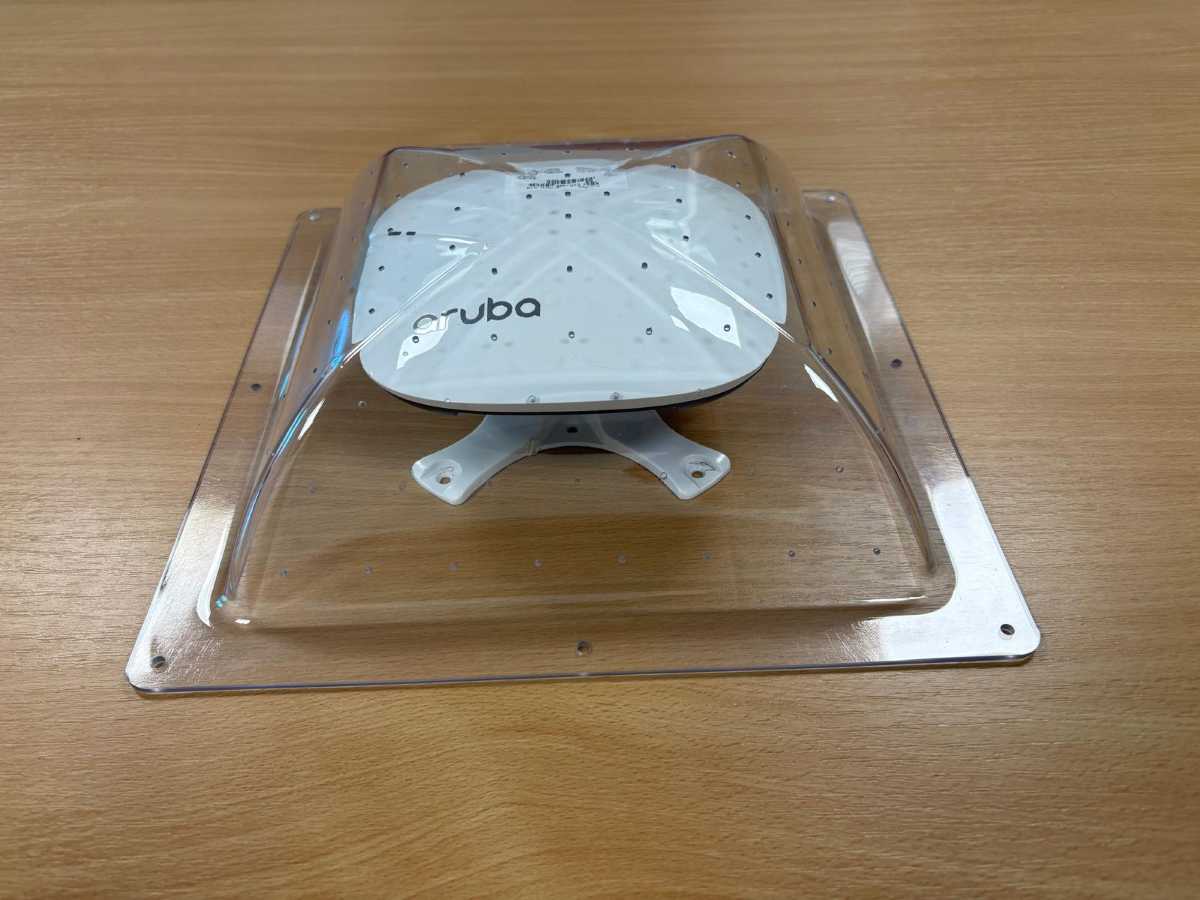
Oystashell® protective Wi-Fi access point enclosures help protect wireless equipment from physical damage and tampering in demanding environments while maintaining wireless performance.
Let’s talk about the 5 most common Wi-Fi access point problems in industrial setups and how Oystashell’s protective enclosures can help.
Key Terms To Know
RF Transparency – The ability of materials to allow radio-frequency signals to pass through with minimal interference.
Access Point (AP) – A network device that provides wireless connectivity to devices within a defined area.
Anti-Ligature – A design approach intended to reduce opportunities for a product to be used as an attachment point.
Anti-Tamper – Features intended to restrict unauthorised access, removal or interference with equipment.
5 Common Wi-Fi Access Point Issues That Can Affect Industrial Facilities
1. Inconsistent Wireless Coverage Across Large Sites
Large industrial facilities can create coverage gaps because their physical layout, equipment and building structures affect how wireless signals travel.
Warehouses, production facilities and distribution centres can cover substantial areas, with long aisles, high shelving, enclosed rooms, loading zones and service routes that often sit within the same network. Machinery and stored materials can alter the wireless environment, while walls, partitions and dense racking can weaken or obstruct signals and make consistent Wi-Fi coverage difficult.
This happens when coverage is planned around physical risks instead of network requirements, causing wireless access point issues like dead zones and unstable connections where reliable connectivity is critical. Devices such as handheld terminals or monitoring equipment may then experience intermittent Wi-Fi access point problems because connectivity depends on where the device is used.
Access point placement must balance coverage with physical protection. Moving an AP may improve coverage but increase its exposure to equipment and tampering. Oystashell® enclosures can help here by protecting Wi-Fi access points from physical damage and allowing installation in locations that support more effective coverage.
The model depends on the access point and installation. For example, the Oystashell® 1 can be used in industrial setups for standard indoor access point installations, while the Oystashell® 2 supports suspended-ceiling applications.
Key Takeaway: Improving coverage can mean placing access points in areas more exposed to physical damage or tampering. This is why getting the right protection matters.
2. Interference From Machinery, Building Structures and Metal Materials
Building structures can affect wireless performance, so network planning must consider the environment around an access point. Similarly, metal materials are common throughout industrial facilities, from racking and machinery to ductwork, partitions and structural components. These materials can affect how radio signals travel through the site, particularly when an access point is surrounded by substantial structures or installed close to larger equipment.
Enclosure material is also a key consideration when safeguarding wireless hardware. A physically strong enclosure isn’t necessarily right if its construction creates an additional barrier to the Wi-Fi equipment’s radio frequency.
Metal Is Not the Right Enclosure Choice
| Common Assumptions | What To Consider |
| Metal provides strong physical protection, so it is always the better enclosure material. | Physical strength is only one consideration. Metal can affect RF signal behaviour and, in high-risk environments, can also introduce additional ligature considerations. |
| The enclosure should completely isolate the access point from its surroundings. | The enclosure needs to protect the hardware while allowing wireless communication to operate as intended. |
Metal enclosures can restrict or reflect wireless signals, but Oystashell’s RF-transparent polycarbonate enclosures provide physical protection without creating the same metal barrier around the access point.
This is even more relevant in industrial settings, where machinery and structural metalwork may already influence how wireless signals travel. An RF-transparent enclosure means the protective housing itself doesn’t add another metal barrier between the AP and the surrounding wireless environment. In these spaces, Oystashell’s enclosure protects the access point without obstructing its wireless signals.
Key Takeaway: The enclosure material must support both the AP’s wireless requirements and the environment’s safety requirements.
3. Physical Damage From Equipment, Vehicles and Accidental Impact
An access point installed in an operational area can face more than intentional interference. Vehicles, moving equipment, stored material and routine activity can all create opportunities for accidental impact. A damaged access point may stop working or develop wireless access point issues that are harder to diagnose. These Wi-Fi access point faults can cause downtime, replacement costs and wider disruption.
The risk isn’t limited to areas where vehicles operate, as access points can also be vulnerable during maintenance work and changes to the surrounding workspace. Identifying locations where network hardware is exposed to these activities helps facilities teams spot potential failure points before damage occurs.
Oystashell’s Wi-Fi access point enclosures are a global safety solution that provide a physical barrier around wireless equipment, supporting use in demanding environments. Choosing an enclosure that matches the installed hardware helps ensure compatibility. For example, larger access points may require a different enclosure configuration than a standard indoor AP, which is why the Oystashell range includes different dimensions and designs instead of a single enclosure format.
Selecting an enclosure that matches the AP specification helps ensure the equipment fits correctly within the installation.
Key Takeaway: Physical exposure is an important factor when assessing access point reliability, so choose an enclosure that matches the AP and its environment to reduce the risk of damage.
4. Dust, Moisture and Harsh Environmental Conditions
Industrial sites can expose networking equipment to dust, moisture and temperature changes, leading to several common Wi-Fi access point problems. These Wi-Fi access point problems in industrial settings can vary significantly and become more severe depending on the setting.
An access point inside a controlled room has different protection requirements from one installed near a loading area or outdoor facility. Dust, moisture and temperature conditions therefore need to be considered before selecting an enclosure.
The same principle applies to the access point enclosure itself, where protection should match both the hardware and the environment in which it will be installed.
Key Takeaway: Assess environmental exposure before selecting an enclosure and match outdoor and water-resistant requirements to the right model.
5. Difficult Access For Maintenance and Upgrades
Protecting an access point should not make inspection, maintenance or authorised replacement unnecessarily difficult. Industrial access points can be installed above working areas, within restricted spaces or in locations that are already difficult for maintenance teams to reach safely.
Oystashell’s transparent construction keeps the access point visible while protected, making it easier for facilities teams to identify the equipment and check its condition without removing it from the enclosure. Oystashell’s enclosures also come with tamper-resistant fixings, which help restrict interference with the enclosure and the equipment inside, allowing only authorised personnel to carry out maintenance when necessary.
Maintenance planning also becomes important when access points need to be replaced or upgraded. A new AP may have different dimensions or mounting requirements from the previous device, so an existing enclosure should not automatically be assumed to remain suitable. Checking compatibility before an upgrade can prevent a new source of wireless access point issues.
Key Takeaway: Consider visibility and compatibility alongside physical protection when access points need regular maintenance or future upgrades.
Match The Enclosure To The Installation
Oystashell provides different Wi-Fi enclosure configurations for various requirements:
| Installation Requirement | Relevant Oystashell Model |
| Standard indoor access point | Oystashell 1 |
| Larger or deeper compatible access point | Oystashell 1D |
| Larger compatible AP requiring water-resistant protection | Oystashell 1DW |
| Narrower compatible access point | Oystashell 1N / 1NW |
| Smaller wireless device | Oystashell 1S |
| Suspended ceiling installation | Oystashell 2 |
| Dedicated outdoor Wi-Fi installation | Oystashell 3 |
For standard indoor installations, an appropriate indoor Oystashell Wi-Fi enclosure can protect a compatible access point. Larger or deeper APs may require Oystashell® 1D, while Oystashell® 1DW provides a compatible larger access point where additional moisture protection is required. For suspended ceilings, Oystashell 2 is designed around a 600 x 600 mm ceiling tile format, providing a different installation approach from surface-mounted enclosures.
Whereas for external or exposed installations, the Oystashell® 3 weather-resistant Wi-Fi enclosure can be a perfect fit. It uses gasket-sealed construction, a reinforced backplate and a waterproof Ethernet cable grommet to help protect equipment from dust and moisture. Its high-impact polycarbonate enclosure also stays RF-transparent, protecting the access point from environmental exposure without the signal obstruction associated with metal enclosures.
This distinction is important because not every model in the Oystashell range should be treated as an outdoor or waterproof product. The installation environment should determine the specification required.
Before Installing or Replacing an Access Point
- Map the Coverage Requirements
Identify areas that need reliable wireless connectivity and assess how the physical layout may affect coverage.
- Assess Physical Exposure
Consider vehicles, machinery, site-related tampering and other activity that could affect the AP.
- Check the access point specifications
Confirm dimensions and mounting arrangements before selecting an enclosure.
- Consider RF and safety requirements
Protection should provide a physical barrier without introducing wireless connectivity or ligature concerns.
- Plan maintenance access
Make sure authorised personnel can inspect and service the equipment when required.
Taking these factors together can help prevent wireless access point issues from becoming a recurring infrastructure problem. It also lets you consider protective measures during network planning instead of adding them only after equipment has been damaged or exposed.
Common Wi-Fi Access Point Protection Mistakes To Avoid
The five problems discussed above can overlap, but how you protect an access point can also introduce Wi-Fi access point faults if you don’t assess the installation as a whole. Here are some of the main points to consider:
- Choosing an enclosure without checking the access point: Different APs require different dimensions and configurations, so the enclosure should match the actual hardware.
- Treating indoor and outdoor installations as the same: Environmental exposure changes the protection requirements. Oystashell 3 is the dedicated outdoor Wi-Fi enclosure, while other models are designed around different applications.
- Using metal without considering RF and safety requirements: Metal can affect wireless signal behaviour and may introduce additional ligature considerations in high-risk settings.
- Ignoring the mounting arrangement: Surface-mounted APs, suspended ceiling installations and outdoor installations may require different enclosure designs.
- Making maintenance an afterthought: Protection should not prevent authorised personnel from maintaining or replacing the equipment when required.
How to Reduce Wi-Fi Access Point Issues in Industrial Facilities
Reducing Wi-Fi access point problems starts with treating the access point, its surroundings and its protection as part of the same infrastructure plan.
Start with coverage requirements and identify where APs need to be positioned. From there, assess the physical and environmental conditions around each installation, including machinery, vehicles, metal structures, moisture, dust and the possibility of tampering.
Then select protection based on the actual installation, such as the options offered by Oystashell. The Oystashell’s Wi-Fi enclosure range uses high-impact, RF-transparent polycarbonate, with different configurations for access point size, mounting arrangement and environmental requirements.
In industrial environments, this approach helps teams address conditions that contribute to common Wi-Fi access point problems while maintaining wireless network operational requirements. It is equally relevant where industrial infrastructure overlaps with healthcare, custodial, educational or public-facing environments, where physical protection and safer equipment design may need to be considered together.
Oystashell Enclosures To Suit Your Industrial Facility
Once you’ve identified the source of your Wi-Fi access point problems, the next question is whether the equipment needs additional protection and, if so, which configuration is appropriate.
Checking the access point model, dimensions, mounting positions and environmental exposure provides a practical starting point for selecting the right enclosure.
Need help identifying the appropriate Oystashell configuration for your installation? Call, email or submit the contact form to discuss your requirements.